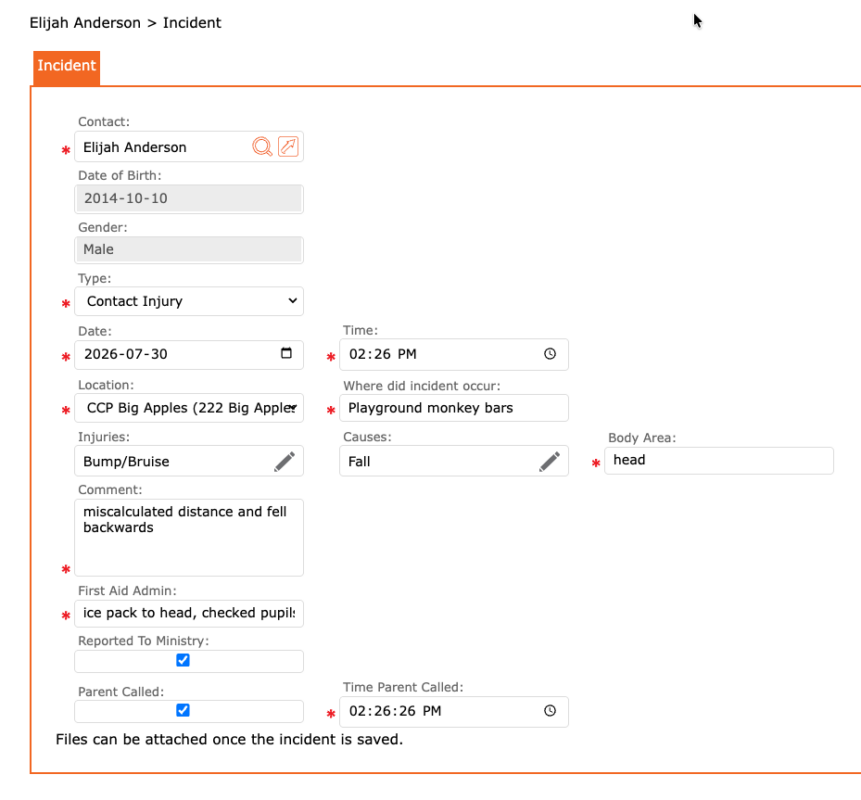
The Incidents section of a child’s account purpose is to record any incidents that have occurred on site at one of the Organization’s Locations.
To record:
- Go to contacts
- Find the child and open their account
- Select the Incidents tab
- Select the “+” to create a new Incident report
- Contact = auto-populated to the child’s name
- Date of Birth = auto-populated as per birthday under general information
- Gender = auto-populated as per gender under general information
- Type = select type of incident
- Date = select date of incident
- Time = select time of incident
- Location = select Location of incident
- Where did the incident occur = enter specific details to where the incident occured
- Injuries = select from a list of injuries (if injury is missing, please add to your main list through the setup > lists)
- Causes = select from a list of causes (if cause is missing, please add to your main list through the setup > lists)
- Body area = select which body area(s) was affected
- Comment = add any applicable comments to this incident
- First Aid Admin: enter what first aid treatments were administered
- Reported to Ministry = select if this incident was reported
- Parent called = select if the parent/guardian was called
- Time Parent called = select the time the parent/guardian was called
- Click the checkmark to apply and return to previous screen
- Click the SAVE icon to complete and record