
The Child Health Condition report displays the health conditions entered into the system under the child’s account health > Health Condition tab.
To access:
- Go to Reports > Child
- Child
- Health
- Child Health Condition
Filters available:
- Location
- Age Group
- Area
- Contact (children within location)
- Display Name (First Name Last Name, Last Name First Name, etc.)
- View Style:
- PDF Child Health Condition List
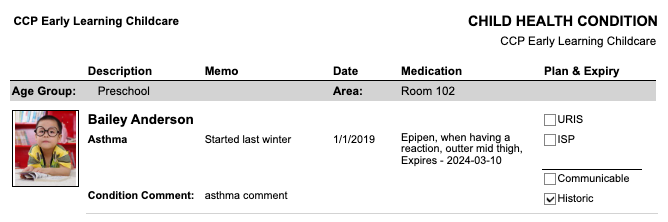
- PDF Child Health Condition with Photo (child’s photo on account)
- PDF Child Health Condition without photo
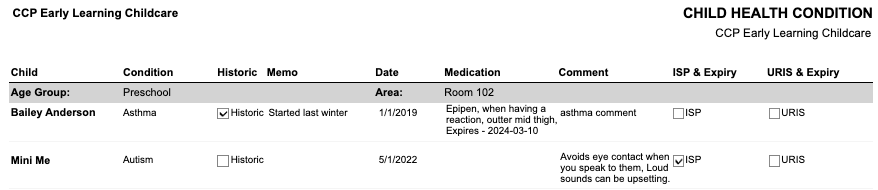
Displayed on report:
- Location
- Child Name
- Condition
- Historic
- Memo
- Date
- Medication
- Comment
- ISP & Expiry
- URIS & Expiry
- Age Group
- Area
View Style: PDF Child Health Condition List
View Style: PDF Child Health Condition with Photo
View Style: PDF Child Health Condition without photo