
Camps –
A camp may be set up with one or many camp sessions.
Camps and sessions are set up as Services at the Organization level. Once created, you can associate specific camp sessions with the appropriate locations.
Summer Camp, Winter and Spring Break Camp, PD days, etc.).
This format will allow the system to open the registration through a parent portal for registration. This will also allow you to collect payment at the time of registration.
Registrations become available on the guardian portal once the camp sessions are associated to a Location.
If maximum registration is reached for a camp session, the child will be added to a waiting list.
Guardian Portal Registration:
Guardians can register their child for any of the camp sessions available at their Location(s). Each session must have at least one payer assigned to ensure participants are billed correctly.
For organizations that process payments through CCP/Telecom Payments, parents and guardians can conveniently pay for camp sessions through the Guardian Portal at the time of registration.
Registration confirmation will be emailed out to the Parent/ Guardian once the registration is confirmed and completed.
Adding Camp Sessions to Child’s Account
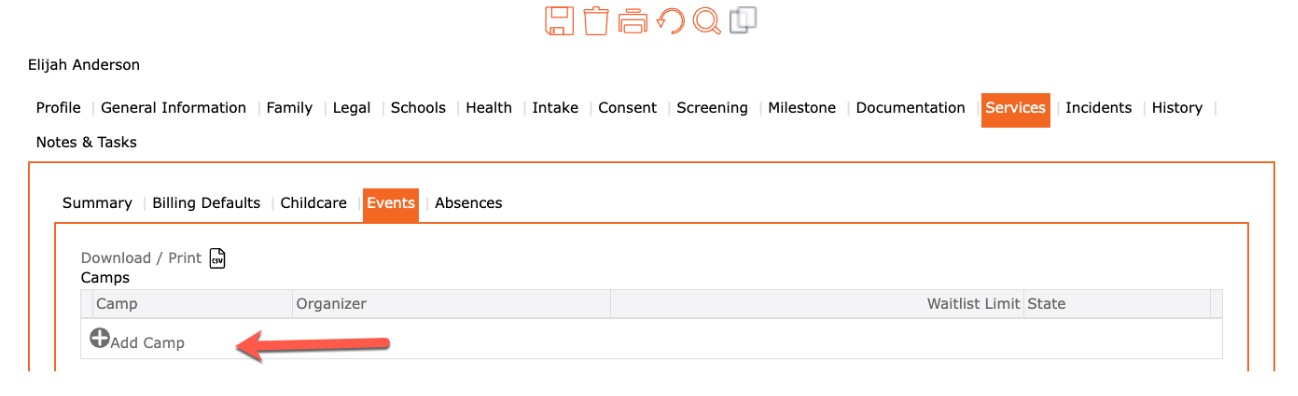
- Go to the left menu > Contact – find the child
- Select the Child
- Select the Services tab
- Go to the Events tab
- Under the Camps table, click “+ Add Camp”
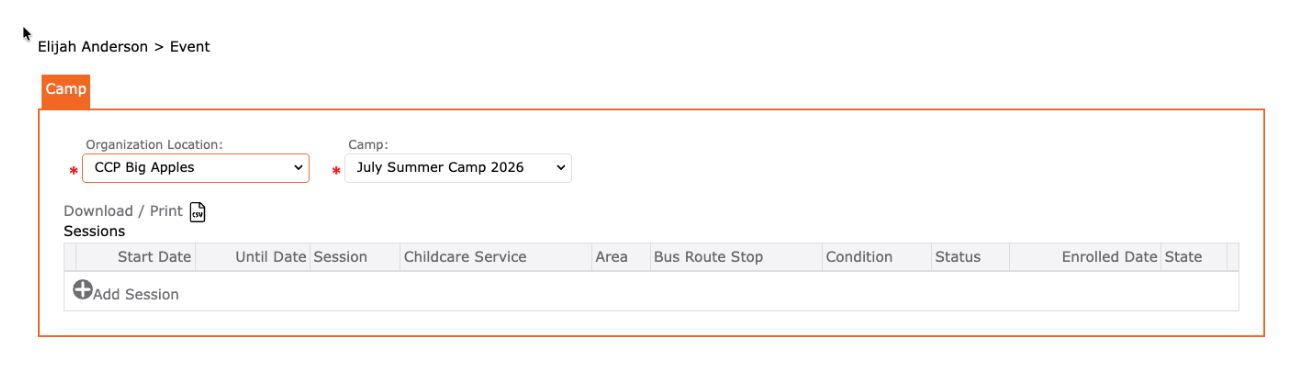
- Organization Location: Select the Location
- Camp: Select the Camp
- In the sessions table, click “+ Add Session”
Camp SESSIONS:
- Select the Session by clicking the edit pencil
- Area: Select if applicable
- Condition: Select applicable
- Status: Confirmed
- Discount Reason: Select if applicable
- Discount Rate: Enter if Discount Reason
- Payers: Review the defaulted attached payer. Click the “+” to add new. Garbage (delete) icon to remove.
- Click the checkmark to apply
- Click the SAVE icon to complete
Also see: