When setting up your organization and it’s subsidy provider, it is important to take the time to review your rates and its items.
To access
Setup > Subsidy Provider > Select Provider > Click on the Rates tab

NOTE: To view how the system processes each field, hover over the field itself.
Descriptions:
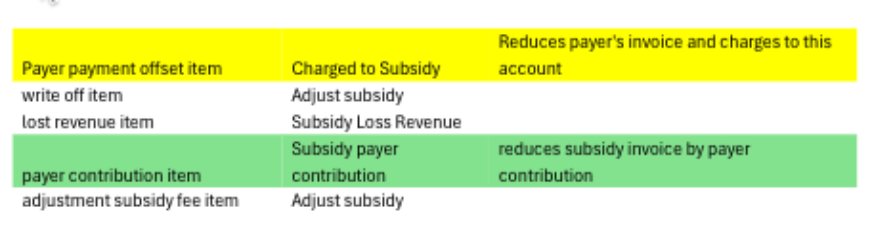
Payer Payment Offset Item = Controls what is removed from the payer’s invoice. Used to reduce the payer’s invoice by subsidy invoice. (this would normally be the parent fee income account)
Lost Revenue Item = Used to reduce the payer’s invoice for any excess fees if capped to subsidy.
Payer Contribution Item = Controls the original credit on the subsidy provider’s invoice. Used to reduce subsidy invoice with any payer contribution. Used to reduce subsidy invoice with any payer contribution. The original credit is posted to the GL account for the Care Code item. The payer contribution item should normally use this same account
Write Off Item = Used to write off subsidy invoice not paid by the provider.

Subsidy Payment Offset Item = Subsidy payment offset item
Grant Calculation Type = Grant calculation type
Examples:
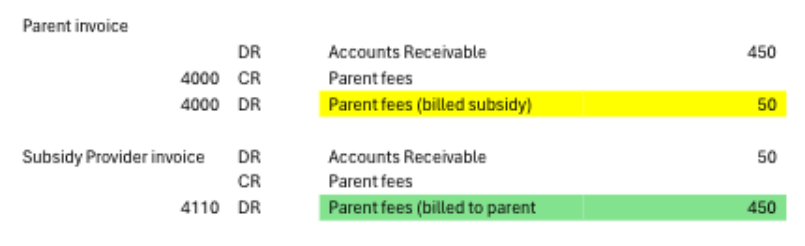
Option 1 — You want the parent fees income account to reflect the amount billed to the payer and you want the subsidy fee income account to reflect the amount billed to the subsidy provider