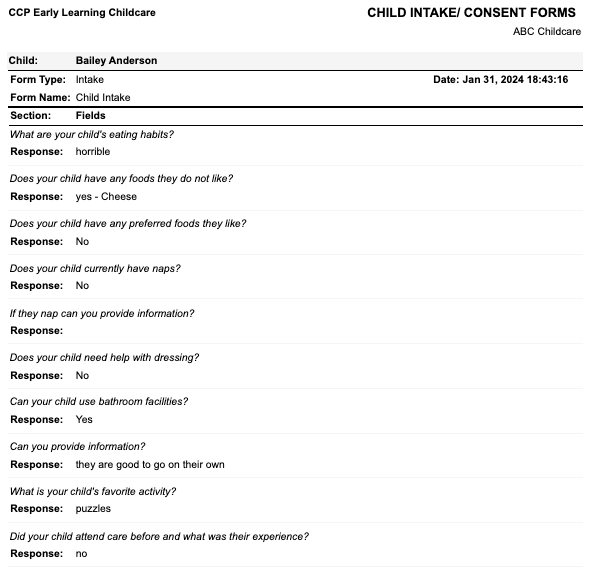
The Child Intake/ Consent Forms Report displays all information added to the child’s account, under the Intake and or Consent tab.
NOTE: Intake and Consent forms are created by creating a custom form in the Setup. Forms will only appear under the Intake and Consent tab once saved. To create an custom form (including consent or intake), please see Custom Forms: How to Add/ Edit a Consent Form
To access:
- Go to the left menu > Reports
- Child
- Programming
- Child Intake/ Consent Forms
Filters available:
- Form Type
- Location
- Age Group
- Area
- Contact (children in location)
- Display Name (First Name Last Name, Last Name First Name, etc.)
- View Style:
- Grid (CSV)
- Consent Summary (Work in Progress)
- PDF Child Intake/ Consent Forms Detail
Displayed on report:
View Style = PDF Child Intake/ Consent Forms Detail:
- Location
- Child Name
- Form Type
- Date
- Form Name
- Sections
- Questions (from Intake/ Consent Form)
- Answers (entered by the user or guardian)