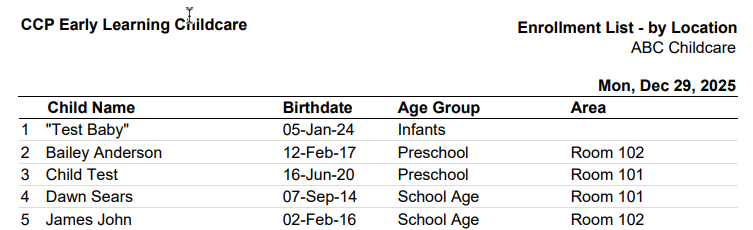
The Attendance Enrollment Daily Report displays all children presently enrolled for the day selected.
How to access:
- Go to the left menu > Reports
- Attendance
- Enrollment
- Daily
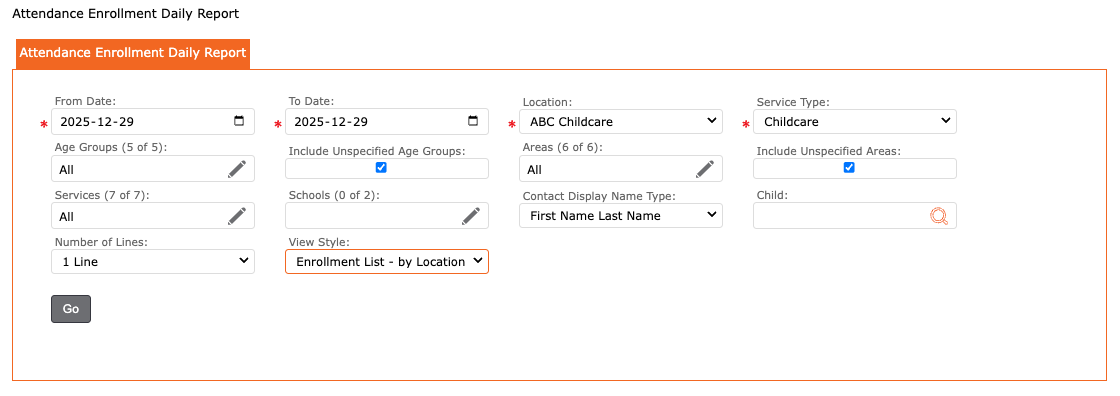
The user can filter by:
- From Date
- To Date
- Location
- Service Type
- Age Groups
- Include Unspecified Age Groups
- Areas
- Include Unspecified Areas
- Services
- Schools
- Contact Display Name Type
- Child
- Number of Lines =
- 1 Line = All Day
- 2 Lines = AM and PM
- 3 Lines = AM, NOON, PM
- View Styles =
- Enrollment List – by Age Group
- Enrollment List – by Age Group/ Area
- Enrollment List – by Area
- Enrollment List – by Area/ Age Group
- Enrollment List – Bus
- Enrollment List – Camps
Report displays the following:
- Location Name,
- Child Name,
- Birthdate,
- Age Group,
- Area